


Manga Buz
2.620.00 Reviews
App Specs
- Version
- 1.4.8
- Updated On
- License
- Free
- Downloads
- 50,000+
- Developer
- spoercsdingshe
- Categories
- Comics
- Platform
- Android
Screenshots
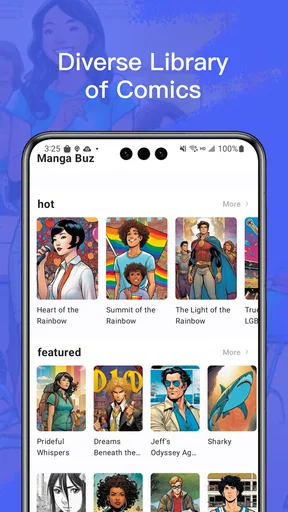
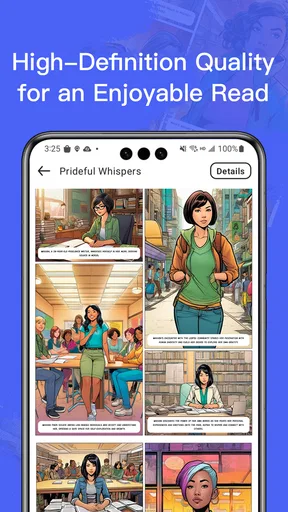
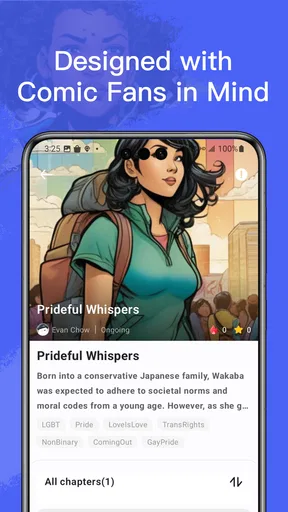
 Analysis by AppCompare
For me, the real test of a manga reader is not how many covers it puts on a screen, but whether I can find a story, settle into a chapter, and keep my place without fighting the interface. That matters even more when I’m reading in short breaks or with tired eyes. Manga Buz is a free comics app from spoercsdingshe, and its appeal is the promise of a simple route from browsing to reading. I’d treat that promise as a starting point, though: the experience needs to suit your habits, your device, and the way you prefer to follow a series.
Finding a reading rhythm that works
Browsing manga is enjoyable only when discovery does not become a chore. A useful approach is to search with a title you already know first, then use the app’s categories to branch out once you understand how its catalog is arranged. That gives you a practical way to judge whether its organization matches your taste rather than spending your first session scrolling at random. If you tend to forget titles between reading sessions, bookmarking a series can also make returning to it less dependent on memory.
I would use those tools differently depending on the situation. At home, I might browse for something new and give a few opening pages a chance; during a quick break, I’d go straight to a bookmarked series rather than trying to choose from a broad list. That small distinction makes a manga app feel much more manageable. It also helps separate two questions that are easy to confuse: whether there is plenty to explore, and whether the specific titles you want are actually easy to locate.
Readability is more than image quality
Clear artwork and zoom can help when a panel contains small lettering or dense backgrounds, but they do not automatically make every page comfortable to read. Zooming repeatedly can interrupt the flow, especially on a phone, so I’d first try a normal reading distance and enlarge only the panels that need closer attention. If a page looks crowded, pausing to inspect a panel is a better trade-off than rushing through and missing dialogue or visual details.
Night mode is useful as an option for dim surroundings, but I would not assume it solves every eye-comfort problem. A dark room, a long session, and a bright screen can still be tiring, so I’d keep the screen at a comfortable level and take breaks when needed. Readers who need larger controls, stronger text contrast, or a particular reading direction should check those details on their own device before settling in. The practical point is simple: image clarity is one part of readability, while control size, page layout, and personal comfort matter just as much.
Different hands, senses, and surroundings
Reading on a touchscreen can be awkward for someone with limited dexterity, hand fatigue, or difficulty making precise gestures. Zooming may help with small panels, yet it can also require extra pinching and repositioning. I would test a short chapter before committing to a long session and notice whether page changes and navigation feel comfortable. If taps or gestures are difficult, a reader with more adaptable controls may be a better fit.
There is a similar trade-off for sensory needs. Night mode may make a bright page less harsh in some settings, while manga itself can contain visually dense art that is demanding even when the display is clear. A quiet, well-lit place and a shorter reading interval can make the experience easier to manage. For someone who relies on screen readers or needs extensive display customization, I would verify compatibility directly rather than assume that a comics layout will work well with assistive tools.
Worth Reading Before You Choose

Flipboard Shows What News Apps Must Do Beyond the Feed

Switching to Android Auto Means Rethinking Your Driving Routine

Google Calendar Makes a Crowded Week Easier to Manage

Ludo King Makes the Most of the Minutes Between Plans

Baby Panda World Brings Quick Play to Modern Phones, but Its Game Library Feels Busy

ESPN’s Live Game View Makes Following Close Games Easier
When connection and time are limited
An offline chapter can be handy for a commute, a waiting room, or travel where a reliable connection is not guaranteed. My practical tip is to prepare before leaving: open the series you intend to read, save the chapters you need while connected, and confirm they are available before switching to airplane mode or entering a weak-signal area. That avoids discovering at the wrong moment that a chapter is not ready. It also makes the app more useful for planned reading than for spontaneous browsing when you are offline.
For short sessions, I’d keep a small, deliberate reading queue rather than collecting more titles than I can remember. A bookmark is most helpful when it reflects what I genuinely plan to continue, not every series that caught my eye once. This is a low-effort way to reduce choice fatigue and make a few spare minutes feel like enough time to read. It also gives you a better sense of whether the app’s discovery tools are helping you find stories or simply encouraging endless browsing.
The World of Manga at Your Fingertips
When I first downloaded Manga Buz, I was blown away by the sheer variety it offers. Whether you're into classic series or the latest releases, this app's got you covered. The interface is clean and intuitive, making it super easy to navigate through different genres and find exactly what you’re looking for.
The app boasts a massive library, and I mean massive. From shonen to seinen, and everything in between, the diversity is impressive. I’ve spent hours exploring new titles that I wouldn’t have discovered otherwise. Plus, the app frequently updates with the latest chapters, so you’re always in the loop.
User Experience That Feels Just Right
One of the things I absolutely love about Manga Buz is how user-friendly it is. The layout is straightforward, with categories neatly organized. You can easily bookmark your favorite series, which is a lifesaver if you're following multiple stories at once. The search function is also top-notch, allowing you to find what you need in no time.
Reading on the app is a pleasure. The pages load quickly, and the quality of the images is crystal clear. You can zoom in and out without losing any detail, which is a huge plus. The night mode feature is another thoughtful touch, making late-night reading easy on the eyes.
Staying Connected and Engaged
What sets Manga Buz apart is its community aspect. The app allows you to connect with other manga enthusiasts and share your thoughts on different series. There’s something incredibly satisfying about discussing plot twists and character arcs with fellow fans.
Moreover, the app includes a section for reviews and ratings, helping you decide what to read next. It's like having a community of manga aficionados at your fingertips, offering recommendations and insights.
Choosing it over familiar alternatives
Compared with a dedicated e-reader or a digital bookstore focused on individual volumes, this app is better suited to someone who wants to browse a comics catalog and follow serial reading from a phone. A bookstore can be the clearer choice when you want a particular volume, a known purchase arrangement, or a library tied to a publisher. A general image reader, meanwhile, may offer more control over files you already own but lacks the same discovery-and-community emphasis described here. I’d choose based on the actual titles I read and how I prefer to obtain them, not on a broad claim that one format is always better.
The trade-off is that a low-friction browsing experience is not the same as a dependable personal archive. If continuity matters to you, keep track of the titles you follow and check that the next chapter is available when you expect it. Community ratings can help narrow choices, but they are opinions, not a substitute for sampling a few pages yourself. Readers who want tightly curated recommendations or a highly predictable catalog may prefer a service built around those priorities.
Who will get the most from it
I can see this working best for a casual or regular manga reader who likes exploring genres, switching between series, and having a community layer alongside reading. It is also a reasonable option for someone who wants to try an app without an upfront purchase: the app is free, while optional in-app purchases range from $2.99 to $199.99 per item. I’d be cautious about spending until I knew what a purchase provides and whether it fits my own reading routine.
At the same time, the average rating is 2.6 from 117 ratings, so I would not treat the enthusiastic parts of my experience as a guarantee that every reader will have the same one. Those figures make it sensible to test the basic workflow before relying on the app as your main manga library. It has 50K+ installs, but popularity alone does not settle questions of comfort or consistency. The app is rated for Everyone, runs on Android 7.0 or later, and its current version is 1.4.8; developer spoercsdingshe released it on February 2, 2024.
Where the experience may fall short
The clearest limitation for me is that a broad catalog and an easy interface do not answer every practical question a reader has. If you need a particular title, a precise chapter history, extensive display adjustments, or controls that accommodate limited hand movement, check those needs early. A quick trial is more useful than assuming that familiar labels such as search, zoom, and night mode cover every requirement. People who depend on highly tailored accessibility settings should favor a reader whose support for those settings they can verify.
There is also a difference between browsing when online and having a satisfying offline routine. Saving chapters ahead can help with travel, but it takes a little planning and does not replace online discovery. Similarly, discussions and ratings are most useful when other readers have left relevant opinions; they should not be the only basis for choosing a series. These are manageable limits for someone who enjoys exploring, but they matter if you want a frictionless, fully predictable reading setup.
A practical way to decide
For a first session, I’d search for one familiar series, bookmark it, and read a short stretch in both the lighting conditions I usually use and the position where I normally hold my phone. Then I’d try a new title through the categories and see whether the discovery path feels useful rather than cluttered. If I planned to read during a commute, I’d test the offline preparation while still connected. These checks take little effort and reveal more than a long browse through the catalog.
I’d skip it if I needed guaranteed access to a particular title, specialized controls, or a carefully verified accessibility setup and could not confirm those needs in practice. I’d also compare alternatives before making optional purchases, especially if I expected to build a long-term collection. For someone who mainly wants a free place to explore manga, keep a few series close, and read in flexible sessions, it is worth trying with realistic expectations.
Why You Should Try It
If you're still on the fence about downloading Manga Buz, let me give you a few more reasons. The app is free, which is always a win in my book. There are ads, but they're not intrusive, and you have the option to remove them with a small fee if they bother you.
Another great feature is the offline reading option. You can download chapters and read them even without an internet connection, making it perfect for those long commutes or when you're traveling without Wi-Fi.
Final Thoughts
All in all, Manga Buz is a must-have for any manga lover. It's comprehensive, user-friendly, and keeps you connected to a community of like-minded fans. Whether you're a seasoned reader or just getting started, this app will enhance your manga experience tenfold. So go ahead, give it a try, and dive into the captivating world of manga!
Pros
- Extensive manga library available.
- Offline reading mode included.
- User-friendly interface design.
- Regular updates with new content.
- Supports multiple languages.
Cons
- Contains in-app ads.
- Requires internet for updates.
- Limited free content.
- Subscription model can be costly.
- No custom reading settings.
FAQs for Manga Buz
What is Manga Buz and what does it offer?
Manga Buz is an app designed for manga enthusiasts, offering a vast collection of manga series across various genres. Users can explore popular titles, discover new releases, and enjoy high-quality scans. The app is regularly updated, ensuring access to the latest chapters as soon as they are released, making it a must-have for manga fans.
Is Manga Buz free to use or does it require a subscription?
Manga Buz offers a freemium model. Users can access a selection of manga for free, but to enjoy the full library and additional features like offline reading and ad-free experience, a subscription is required. This model allows users to explore and decide if the premium features align with their reading habits.
How user-friendly is the Manga Buz interface for new users?
Manga Buz boasts an intuitive interface that’s easy to navigate, even for newcomers. The app's design is clean, with categories and a search function that make finding manga straightforward. Whether browsing new releases or searching for specific titles, the user experience is smooth, enhancing overall accessibility.
Does Manga Buz support offline reading?
Yes, Manga Buz supports offline reading, but this feature is available to premium subscribers only. Users can download their favorite manga chapters to enjoy without an internet connection, making it convenient for reading on the go. This is especially beneficial for those with limited or unreliable internet access.
What devices and operating systems are compatible with Manga Buz?
Manga Buz is compatible with both Android and iOS devices, ensuring a wide range of accessibility. It requires a relatively recent version of the operating systems to function properly, so users should check their device compatibility before downloading. This ensures optimal performance and access to all features.


